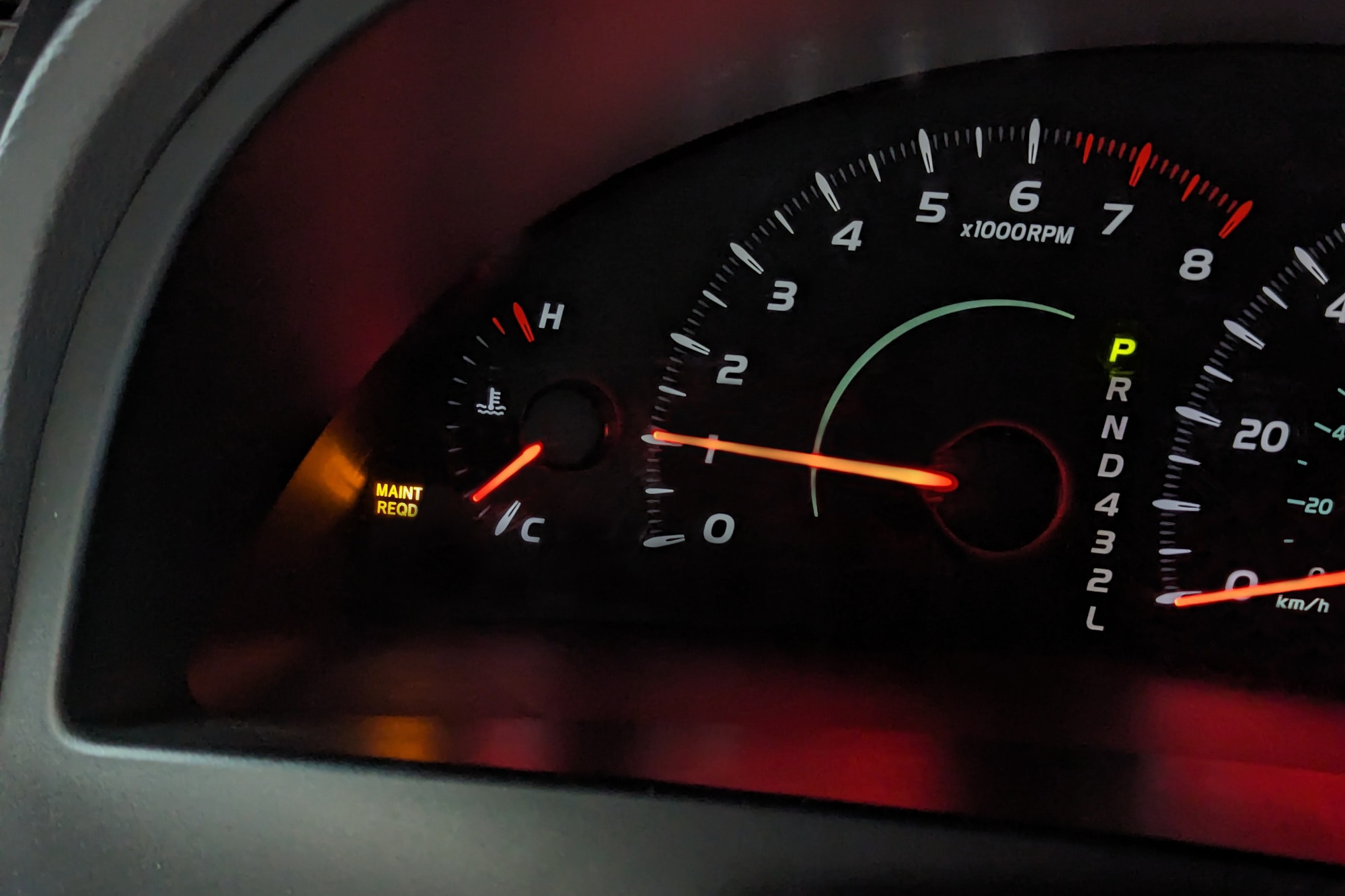
Hey, if you’re reading this, chances are that pesky maintenance light on your Toyota Camry dashboard just lit up, and it’s nagging at you like a reminder you can’t ignore. I get it—I’ve been there myself. A few years back, I was rushing to work in my old Camry when that yellow “MAINT REQD” glow caught my eye. At first, I panicked, thinking something major was wrong, but it turned out to be a simple nudge for routine care. That’s why I’m here to walk you through how to reset maintenance light on Toyota Camry in a way that’s quick, straightforward, and doesn’t require a trip to the mechanic.
We’ll cover everything from why it happens to step-by-step instructions for various models, so you can handle it yourself and get back on the road feeling confident.
As a Camry owner for over a decade, I’ve dealt with this light more times than I can count, especially after oil changes or tire rotations. It’s not just about turning it off; it’s about understanding your car better and saving some cash along the way. In this guide, we’ll break it down so even if you’re not a car expert, you’ll feel like one by the end. Let’s jump in and tackle how to reset a maintenance light on a Toyota Camry without any hassle.
What the Maintenance Light Really Means for Your Toyota Camry
Before we get into the reset process, let’s talk about what this light is all about. The maintenance light, often labeled “MAINT REQD” or something similar, isn’t a warning of imminent disaster. It’s more like your car’s way of saying, “Hey, it’s time for some TLC.” Toyota designed it to remind you of scheduled services based on mileage or time intervals. For most Camry models, it triggers around every 5,000 miles, typically after an oil change is due.
I recall chatting with a friend who ignored his for weeks, worried it meant a big repair bill. Turns out, he just needed to address the basics, and resetting it gave him peace of mind. Ignoring it won’t hurt your car short-term, but it can lead to overlooking real issues down the line. So, knowing how to reset maintenance light on Toyota Camry helps you stay on top of things without unnecessary stress.
This light ties into your vehicle’s onboard computer, tracking things like engine oil life, filters, and other routine checks. In older Camrys, it’s a simple mileage counter, while newer ones might integrate with more advanced systems. Either way, resetting it after service keeps everything in sync.
Think about it: Your Camry is reliable, but like any machine, it needs regular attention to keep performing at its best. That light is your built-in scheduler, and learning how to reset it empowers you to manage your car’s health proactively.
Why Resetting the Maintenance Light Matters
Resetting isn’t just about clearing the dashboard—it’s about maintaining a routine that extends your Camry’s life. When the light comes on, it’s often after you’ve hit a mileage milestone, and resetting it starts the counter fresh for the next interval. If you skip this, the light stays on, which can be distracting and might make you miss when the next service is truly due.
From my experience, after doing my own oil change, forgetting to reset the light left me second-guessing every time I started the car. It was annoying, like a phone notification that won’t go away. By mastering how to reset maintenance light on Toyota Camry, you avoid that frustration and build a habit of regular upkeep.
Plus, if you’re selling your Camry or taking it for an inspection, a clear dashboard looks better and shows you’ve been attentive. It’s a small step that speaks volumes about your care for the vehicle.
Preparing to Reset: What You’ll Need
The beauty of how to reset a maintenance light on a Toyota Camry is that it usually requires no special tools—just your key or the start button, and a bit of patience. For most models, you’ll work with the odometer button on the dashboard. Make sure your car is parked safely, and you’re not driving while doing this.
If your Camry has a push-button start, the process is similar but adapted. No need for fancy gadgets; this is DIY at its simplest. However, if the light persists after reset or comes with other warnings, it might be time to check the manual or consult a pro.
I once tried resetting mine in a hurry without reading the steps fully, and it didn’t work the first time. Lesson learned: Take a moment to prepare, and it’ll go smoothly.
Step-by-Step Guide: How to Reset Maintenance Light on Toyota Camry
Now, the main event. The exact steps for how to reset maintenance light on Toyota Camry can vary by model year, as Toyota has updated the system over time. I’ll cover the most common generations, based on reliable sources and my own trials. Always refer to your owner’s manual for specifics, but these should cover 2007 models and up.
For 2007-2011 Toyota Camry Models
If you have an older Camry from this era, the process is hands-on and quick.
- Start with the ignition off. Sit in the driver’s seat and make sure the car is in park.
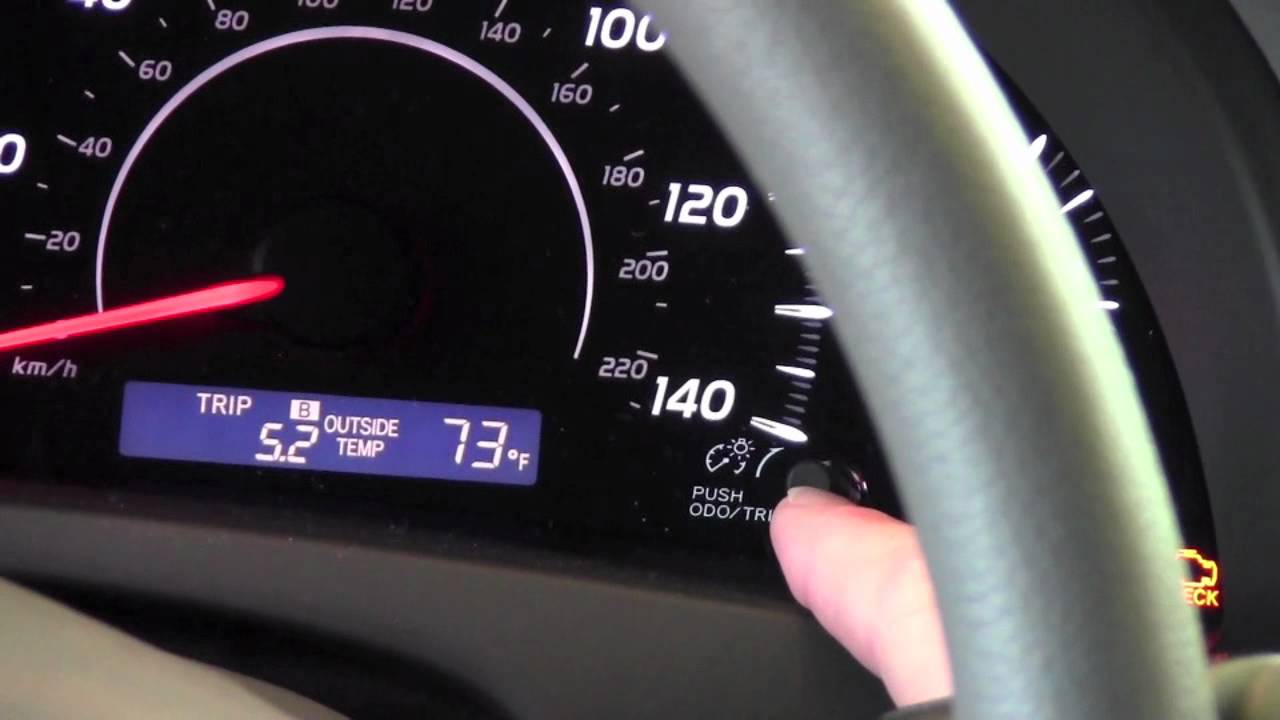
- Locate the trip odometer button on your dashboard—it’s usually a small knob or button near the speedometer.
- Press and hold this button while turning the key to the “ON” position (don’t start the engine).
- Keep holding for about 10 seconds. You’ll see the odometer display change, perhaps flashing dashes or zeros.
- Once it clears or shows “000000,” release the button. The maintenance light should turn off.
I remember doing this on my 2008 Camry after an oil swap—it took two tries because I let go too soon. Patience is key here.
If it doesn’t work, double-check you’re on “Trip A” before starting. This method resets the counter for the next 5,000 miles.
For 2012-2017 Toyota Camry Models
These mid-generation Camrys often have a similar setup, but some have push-button starts.
- Ensure the vehicle is off.
- Press the start button twice to turn on the ignition without cranking the engine (or use the key to “ON”).
- Cycle the odometer to “Trip A” using the button.
- Turn the ignition off again.
- Hold the odometer button and turn the ignition back to “ON.”
- Hold until the display shows zeros or the light flashes and goes out—usually 5-10 seconds.
A buddy of mine with a 2015 model swore by this after his light stayed on post-service. It’s reliable and takes under a minute.
For hybrids in this range, the steps are nearly identical, but check for any hybrid-specific indicators.
For 2018 and Newer Toyota Camry Models
Newer Camrys, especially from 2019 onward, use the multi-information display (MID) and settings menu, making it even easier.
- Turn the ignition to “ON” (press start button twice without brake).
- Use the steering wheel controls to navigate to the settings icon—it looks like a gear.
- Select “Vehicle Settings” or “Maintenance System.”
- Choose “Scheduled Maintenance” or “Oil Maintenance.”
- Confirm to reset, often by selecting “Yes.”
- The system will confirm, and the light should clear.
This digital approach feels modern, and I’ve helped a neighbor with her 2022 Camry do it in seconds. If your model has Toyota Safety Sense, it might integrate here too.
No matter the year, test by starting the engine—the light should be gone. If not, retry or check for error codes.
 Common Mistakes to Avoid When Resetting
Even simple tasks like how to reset maintenance light on Toyota Camry can trip you up. One big one: Not holding the button long enough. I did that once, and the light mocked me until I tried again.
Another: Forgetting to set the odometer to “Trip A.” Many guides stress this, as it’s the reset trigger.
If you have a push-start model, ensure you’re not pressing the brake, or it’ll start the engine. Also, avoid resetting without actual maintenance; it’s there for a reason.
If the light returns immediately, it could mean a deeper issue—time for a scan tool or dealer visit.
Benefits of Handling This Yourself
Doing how to reset a maintenance light on a Toyota Camry at home saves time and money. Dealerships might charge for this simple task, but you can do it free.
It also builds your confidence in car care. I started with resets and moved to oil changes, feeling more connected to my vehicle.
Plus, it keeps your dashboard clean, reducing driver distraction. A clear mind on the road is priceless.
Troubleshooting If the Reset Doesn’t Work
Sometimes, the reset doesn’t stick. First, confirm your model year’s steps—older Camrys differ from new ones.
If it’s a 2018+ with the menu, ensure you’re in the right submenu. Battery issues can interfere too; a weak one might need replacement.
In rare cases, a fault code is present. Use an OBD-II scanner (affordable online) to check.
I once had a stubborn light due to a loose connection—tightening it fixed everything.
 Keeping Your Toyota Camry in Top Shape Beyond the Reset
Resetting is great, but pair it with actual maintenance. Change oil every 5,000-10,000 miles, depending on your driving.
Rotate tires, check fluids, and inspect brakes regularly. Your Camry will thank you with better performance and longevity.
I make it a ritual: After service, reset the light, and note the mileage. It keeps me organized.
Frequently Asked Questions About How to Reset Maintenance Light on Toyota Camry
Got questions? Here are some common ones.
Does resetting the light affect warranty? No, as long as you perform the required service.
How often does it come on? Typically every 5,000 miles, but check your manual.
What if I don’t have the key? For push-start, it’s the same process.
These cover most concerns from fellow owners I’ve talked to.
Wrapping Up Your Camry Care Journey
There you have it—a complete guide on how to reset maintenance light on Toyota Camry that’s fast, easy, and empowering. Whether it’s your daily driver or a family hauler, taking these steps keeps it running smoothly. Remember that time I mentioned my first reset? It turned a frustrating moment into a win, and I hope this does the same for you.
If you follow these instructions, you’ll handle how to reset a maintenance light on a Toyota Camry like a pro. Stay safe out there, and happy driving!